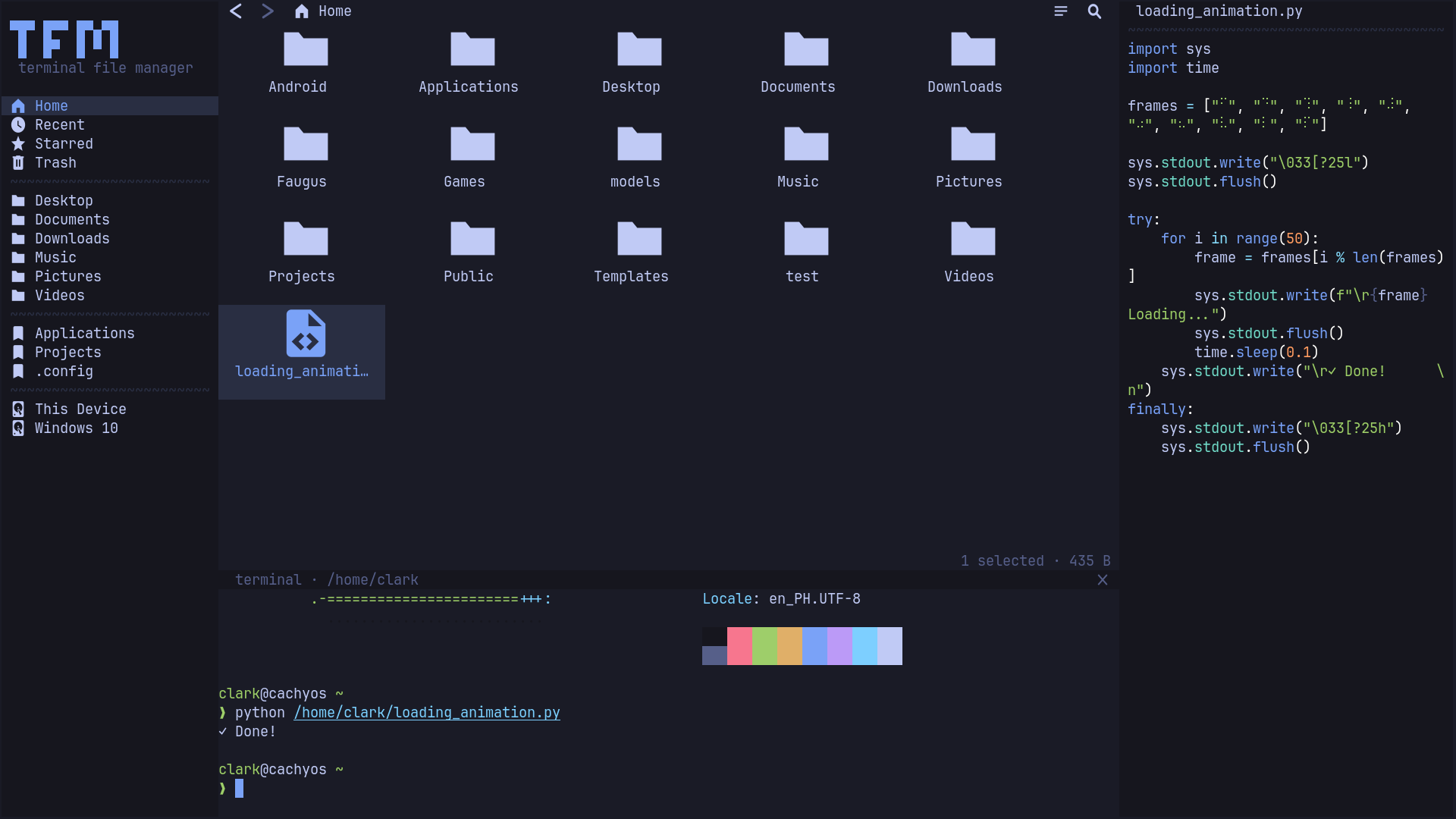
Features
a GUI file manager that lives in your terminal
Mouse-first
Click, rubber-band select, right-click context menus, inline rename, no memorizing a modal keymap to get things done. ctrl+click toggles, shift+click ranges.
Drag & drop
Move files between folders with ctrl+drag. Drag out of the terminal to other apps and drop files in, cross-app DnD via the kitty graphics protocol (OSC 72).
Desktop integration
GTK bookmarks, recently-used files, XDG trash with restore, system clipboard bridge with GUI apps, removable drives via udisksctl — eject unmounts every partition and powers the disk off, and plug/unplug shows up live. Opt in to make tfm your default file manager. Undo/redo for every reversible operation: permanent delete / empty trash cannot be undone.
Embedded terminal
Right-click empty space → Open Terminal Here runs your $SHELL in a pane at the current folder. Drop files onto the prompt to paste their paths.
Previews & thumbnails
Image and video thumbnails (kitty graphics), tree-sitter syntax-highlighted text previews, folder stats, with a disk-cached thumbnail pipeline so folder revisits are instant.
Dual pane
Two independent file panes side by side, each with its own top bar and tabs. tab switches sides, F5 / F6 copy or move across.
Tabs
Per-pane tab strips with ctrl+t / w and ctrl+tab cycling, middle-click to close. Sessions restore them on launch.
Network locations
Open sftp://, smb://, WebDAV and FTP shares through gvfs, sidebar → Connect to Server…, credentials prompted in-app.
Archives
Open a tar.gz, zip, 7z (even a read-only rar) as a folder you can walk and preview, or right-click → Extract Here (staged, conflict prompt, undoable) / Compress to… across 13 formats.
Plugins
TypeScript plugins with hot reload: commands, context menus, previews, events, UI slots. Install from a git URL or tfm plugins add.
Animation
Staggered file entrances, sidebar and top-bar intros, auto-hide drawer slides — all tunable under Settings → animations, calm by default.
32 themes
Tokyo Night, Catppuccin, Dracula, Gruvbox, Nord, Rose Pine, Solarized… live-switchable in the settings menu, fully configurable via config.toml. Try them below.
Themes
32 bundled presets, switchable at runtime
click any theme to restyle this page, the same live palette swap ships inside tfm (esc → Settings → Theme).
Keys
muscle-memory bindings, every one remappable under [keys] in config.toml
| type anywhere | live search · enter opens first match |
| enter / f2 | open / rename |
| backspace / alt+up | parent directory |
| esc | menu (settings, view mode, sort, …) |
| ctrl+p | command palette · run any action |
| ctrl+q | quit |
| ctrl+z / ctrl+y | undo / redo (ctrl+shift+z also redoes) |
| ctrl+x / c / v | cut / copy / paste |
| ctrl+d | duplicate |
| ctrl+a | select all |
| space / shift+arrows | toggle / extend selection |
| f1 | help |
| ctrl+t / w | new tab / close tab |
| ctrl+tab | next / previous tab |
| delete | trash (again in trash: permanent) |
| ctrl+click / shift+click | toggle / range select |
| plain drag | drag out of terminal (kitty) |
| ctrl+drag | move inside tfm |
| right-click | context menu |
| ctrl+h | toggle hidden files |
| tab | switch focused pane |
| F5 / F6 | copy / move to other pane |
| ctrl+shift+d | toggle dual pane |
| ctrl+shift+s | connect to server |
| ctrl+` / F4 | terminal |
| F3 | preview pane |
| alt+home | home folder |
| alt+left / right | history back / forward |
| ctrl+shift+n / ctrl+alt+n | new folder / new file |
| ctrl+= / - | zoom in / out |
| ctrl+r | reload places |
| ctrl+alt+r | restart |
| ctrl+g / l | grid-list view / path bar |
| alt+enter | properties |
Config
~/.config/tfm/config.toml, invalid values fall back per-key, never fatal
# ~/.config/tfm/config.toml, see config.example.toml in the repo
[ui]
sidebar-width   = 26      # 16..60 cells
tile-width      = 20      # 10..40 cells (grid view)
tile-height     = 5       # 3..10 cells
preview-enabled = false   # right-side preview pane
view-mode       = "grid"  # "grid" tiles or "list" rows
ui-style        = "solid" # "solid" filled panels; "outline" rounded borders; "outline-partial" outline chrome, solid floats
restore-session = false   # reopen last folder on launch
persist-undo    = false   # undo history survives restarts
transparent-bg  = "off"   # "off" opaque; "on" faithful hex; "force" terminal bg shows through

[theme]
bg     = "#1a1b26"   # or pick a preset: esc → Settings → Theme
accent = "#7aa2f7"

[keys]
quit = ["ctrl+q"]    # every action remappable, several binds allowed